
The payload is Nuxt's mechanism for transferring data from server to client during SSR. When useFetch, useAsyncData, or useState resolve on the server, Nuxt serializes their results into a <script> tag embedded in the HTML response. On the client, Nuxt reads that serialized data instead of re-executing the fetch calls. This is why there is no "double fetch": the server fetches once, the client reuses the result.
How it works
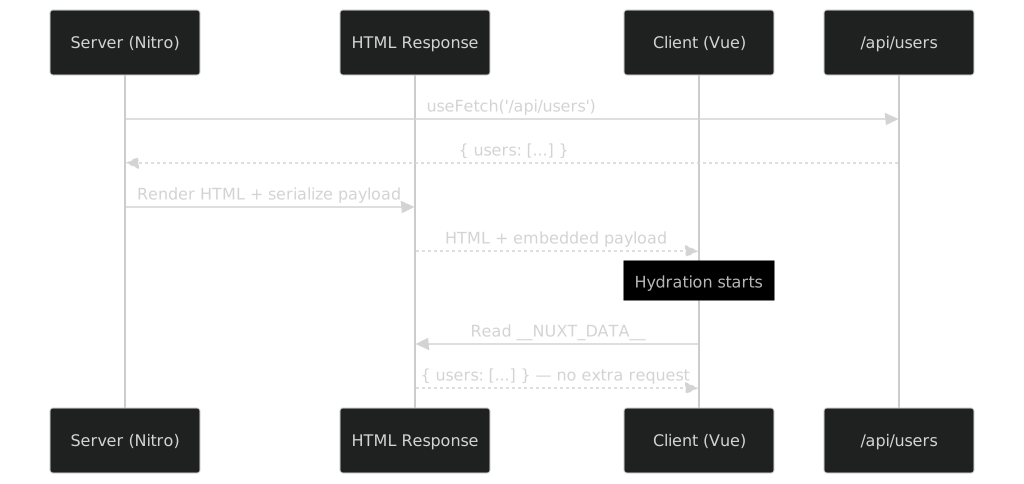
During SSR, this is the sequence:
- The server runs
<script setup>, which callsuseFetch('/api/users') - The server waits for the fetch to resolve and renders the HTML with the data
- Nuxt serializes the fetched data into a
<script>tag in the HTML - The browser receives the HTML (already rendered) and the embedded payload
- On hydration,
useFetchreads the payload instead of calling/api/usersagain - The app becomes interactive with no extra network request
What's in the HTML
After SSR, the HTML contains something like this:
<div id="__nuxt">
  <!-- Server-rendered HTML with the data already visible -->
  <ul>
    <li>Alice</li>
    <li>Bob</li>
  </ul>
</div>

<!-- The payload: serialized data from server-side fetches -->
<script type="application/json" id="__NUXT_DATA__">
  [
    [
      "users",
      [
        { "id": 1, "name": "Alice" },
        { "id": 2, "name": "Bob" }
      ]
    ]
  ]
</script>
The payload contains every piece of state resolved during SSR: useFetch results, useAsyncData results, useState values, and Pinia store state.
Without the payload (the double-fetch problem)
If Nuxt didn't serialize the data, the client would have to fetch it again:
Server: fetch /api/users → render HTML → send to browser       (fetch #1)
Client: hydrate → useFetch runs again → fetch /api/users        (fetch #2)
The user sees the rendered content, then it disappears briefly while the client re-fetches, then it reappears. This causes a flash of empty content and doubles the API load.
With the payload, the client skips fetch #2 entirely.
What gets included in the payload
<script setup>
// All of these are serialized into the payload during SSR:

// 1. useFetch results
const { data: users } = await useFetch('/api/users')

// 2. useAsyncData results
const { data: stats } = await useAsyncData('stats', () => {
  return $fetch('/api/stats')
})

// 3. useState values
const count = useState('counter', () => 0)
</script>
Pinia stores used during SSR are also serialized. The client hydrates the stores from the payload without re-running the initialization logic.
$fetch does NOT use the payload
<script setup>
// This is NOT deduplicated — it runs on both server AND client
const users = ref(await $fetch('/api/users'))
</script>
Raw $fetch in <script setup> runs during SSR and then runs again during client hydration. It has no payload integration. Always use useFetch or useAsyncData for data that should transfer from server to client.
Payload serialization with devalue
Since Nuxt 3.4+, the payload is serialized using devalue instead of plain JSON. This means built-in types like Date, Map, Set, RegExp, BigInt, Infinity, NaN, undefined, and even cyclic references are handled automatically. No custom code needed.
Custom reducers and revivers are only necessary for custom class instances that devalue doesn't know about:
// plugins/payload.ts
class UserSettings {
  constructor(
    public theme: string,
    public locale: string
  ) {}
}

export default defineNuxtPlugin(() => {
  definePayloadReducer('UserSettings', (value) => {
    return value instanceof UserSettings
      ? { theme: value.theme, locale: value.locale }
      : undefined
  })

  definePayloadReviver('UserSettings', (value) => {
    return new UserSettings(value.theme, value.locale)
  })
})
The reducer runs on the server (serializes), the reviver runs on the client (deserializes).
Inspecting the payload
In development, you can see the payload in two places:
- View Source: search for
__NUXT_DATA__in the HTML response - Nuxt DevTools: the Payload tab shows all serialized data with keys and values
In production, the payload is compressed. You can check the Network tab for the initial HTML size to see how much data is being transferred.
Payload size considerations
Large payloads slow down the initial page load because the browser must parse a large JSON blob before hydration starts:
<script setup>
// BAD: serializes 10,000 items into the HTML payload
const { data: allProducts } = await useFetch('/api/products')

// GOOD: paginate, only serialize what the first page needs
const { data: products } = await useFetch('/api/products', {
  query: { page: 1, limit: 20 }
})
</script>
If you fetch a huge dataset during SSR, the entire dataset ends up in the HTML. Paginate on the server to keep the payload small.
Summary
| Concept | Behavior |
|---|---|
useFetch / useAsyncData | Server fetches, result serialized in payload, client reuses |
useState | Server sets value, serialized in payload, client hydrates |
| Pinia stores | Server state serialized, client hydrates |
Raw $fetch in setup | Runs on both server and client (double fetch) |
$fetch in event handlers | Client-only, no SSR involvement |
See also: How does data fetching work in Nuxt? · What are the rendering modes in Nuxt? · What is cross-request state pollution in SSR?
References
- Payload - Nuxt docs
- Data Fetching - Nuxt docs
- useState - Nuxt docs