
The standard pattern uses four pieces working together: a useAuth composable that exposes the auth state and methods, a plugin that initializes the user session on app start, a route middleware that protects pages, and a server middleware that protects API routes. Tokens are stored in cookies (not localStorage) because cookies are accessible during SSR.
Why cookies, not localStorage
localStorage doesn't exist on the server. During SSR, the server needs to know who the user is to render personalized content and protect pages. Cookies are sent with every HTTP request, so the server can read them during both SSR and API calls.
// composables/useAuth.ts
export function useAuth() {
  const user = useState<User | null>('auth-user', () => null)
  const token = useCookie('auth-token', {
    maxAge: 60 * 60 * 24 * 7, // 7 days
    sameSite: 'lax',
    secure: true
  })

  const loggedIn = computed(() => !!user.value)

  async function login(email: string, password: string) {
    const response = await $fetch<{ user: User }>('/api/auth/login', {
      method: 'POST',
      body: { email, password }
    })
    // No need to set token.value manually — the server sets it via
    // setCookie, and useCookie('auth-token') picks it up automatically
    user.value = response.user
  }

  async function logout() {
    await $fetch('/api/auth/logout', { method: 'POST' })
    token.value = null
    user.value = null
    navigateTo('/login')
  }

  async function fetchUser() {
    if (!token.value) {
      user.value = null
      return
    }
    try {
      user.value = await $fetch<User>('/api/auth/me')
    } catch {
      token.value = null
      user.value = null
    }
  }

  return { user, token, loggedIn, login, logout, fetchUser }
}
useCookie is SSR-safe: it reads from the request headers on the server and from document.cookie on the client. useState ensures the user state doesn't leak between requests on the server.
Plugin: initialize session on app start
// plugins/auth.ts
export default defineNuxtPlugin(async () => {
  const { fetchUser } = useAuth()
  await fetchUser()
})
This runs once when the app starts (on both server and client). If the user has a valid token cookie, fetchUser loads their profile. If the token is expired or invalid, it clears the auth state.
Route middleware: protect pages
// middleware/auth.ts
export default defineNuxtRouteMiddleware(() => {
  const { loggedIn } = useAuth()

  if (!loggedIn.value) {
    return navigateTo('/login')
  }
})// middleware/guest.ts (redirect logged-in users away from login page)
export default defineNuxtRouteMiddleware(() => {
const { loggedIn } = useAuth()
if (loggedIn.value) {
return navigateTo('/dashboard')
}
})Apply them to pages with definePageMeta:
<!-- pages/dashboard.vue -->
<script setup>
definePageMeta({ middleware: 'auth' })
</script><!-- pages/login.vue -->
<script setup>
definePageMeta({ middleware: 'guest' })
</script>Server middleware: protect API routes
Route middleware only protects pages. Anyone can call /api/admin/users directly. Protect the data at the server layer:
// server/middleware/auth.ts
export default defineEventHandler((event) => {
  const url = getRequestURL(event).pathname

  if (!url.startsWith('/api/') || url.startsWith('/api/auth/')) {
    return // skip non-API routes and public auth endpoints
  }

  const token = getCookie(event, 'auth-token')
  if (!token) {
    throw createError({ statusCode: 401, statusMessage: 'Unauthorized' })
  }

  try {
    event.context.user = verifyJWT(token)
  } catch {
    throw createError({ statusCode: 401, statusMessage: 'Invalid token' })
  }
})
Now every API route can access the authenticated user through event.context.user:
// server/api/auth/me.get.ts
export default defineEventHandler((event) => {
  const user = event.context.user
  if (!user) throw createError({ statusCode: 401 })
  return user
})
Server API routes: login and logout
// server/api/auth/login.post.ts
export default defineEventHandler(async (event) => {
  const { email, password } = await readBody(event)

  const user = await findUserByEmail(email)
  if (!user || !(await verifyPassword(password, user.passwordHash))) {
    throw createError({ statusCode: 401, statusMessage: 'Invalid credentials' })
  }

  const token = signJWT({ userId: user.id, role: user.role })

  // Not httpOnly — the client composable (useCookie) reads and writes
  // this cookie directly. If you need httpOnly cookies for better XSS
  // protection, the server must manage all cookie access and the client
  // should check auth state via a server endpoint (e.g. /api/auth/me)
  // instead of reading the cookie with useCookie.
  setCookie(event, 'auth-token', token, {
    secure: true,
    sameSite: 'lax',
    maxAge: 60 * 60 * 24 * 7
  })

  return {
    user: { id: user.id, name: user.name, email: user.email, role: user.role }
  }
})// server/api/auth/logout.post.ts
export default defineEventHandler((event) => {
deleteCookie(event, 'auth-token')
return { ok: true }
})Because the client-side useCookie('auth-token') composable reads and writes the cookie directly (for login, logout, and the loggedIn check), the cookie must NOT be httpOnly. An httpOnly cookie cannot be accessed by JavaScript at all, so useCookie would read null. If you need the stronger XSS protection of httpOnly cookies, the server must manage all cookie operations and the client should NOT use useCookie to read the token. Instead, check auth state through a server endpoint like /api/auth/me.
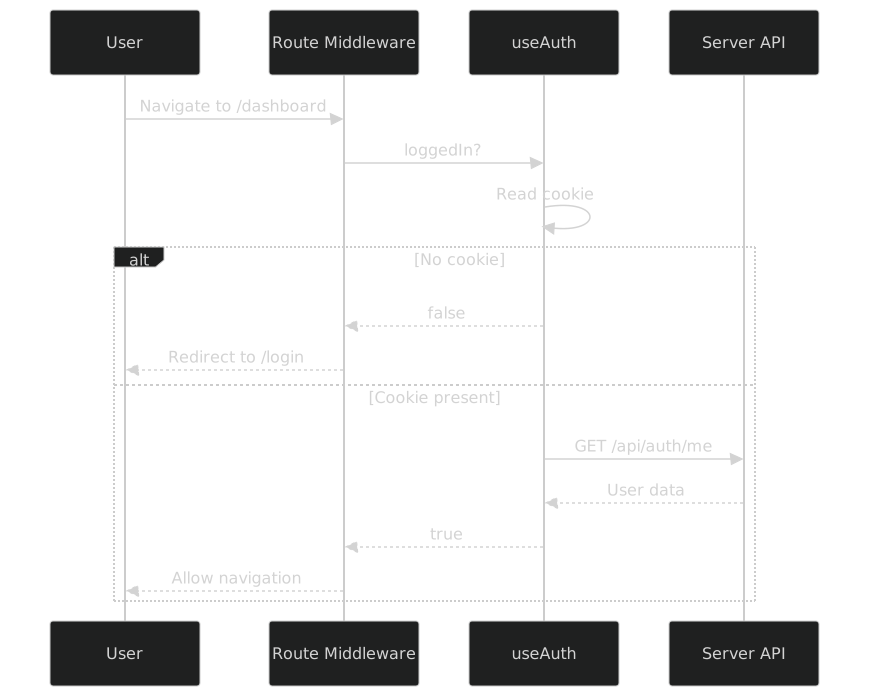
How the pieces connect
App starts
  → auth plugin runs → fetchUser() → reads cookie → loads user

User visits /dashboard
  → auth middleware → loggedIn? → yes → render page
                                → no  → redirect to /login

User calls /api/admin/users
  → server middleware → valid token? → yes → attach user to context → handle request
                                     → no  → 401 Unauthorized

User clicks logout
  → useAuth().logout() → POST /api/auth/logout → clear cookie → clear state → redirect
Summary
| Piece | Location | Responsibility |
|---|---|---|
useAuth composable | composables/ | Auth state, login/logout methods |
| Auth plugin | plugins/ | Initialize session on app start |
| Route middleware | middleware/ | Protect pages, redirect unauthenticated users |
| Server middleware | server/middleware/ | Protect API routes, validate tokens |
| Server API routes | server/api/auth/ | Login, logout, token management |
| Cookie | Sent with every request | Token storage (SSR-safe) |
See also: How do you implement authentication with Vue Router? · What is Nuxt middleware? · What is the difference between server and route middleware?
References
- nuxt-auth-utils - GitHub
- middleware/ Directory - Nuxt docs
- useCookie - Nuxt docs